


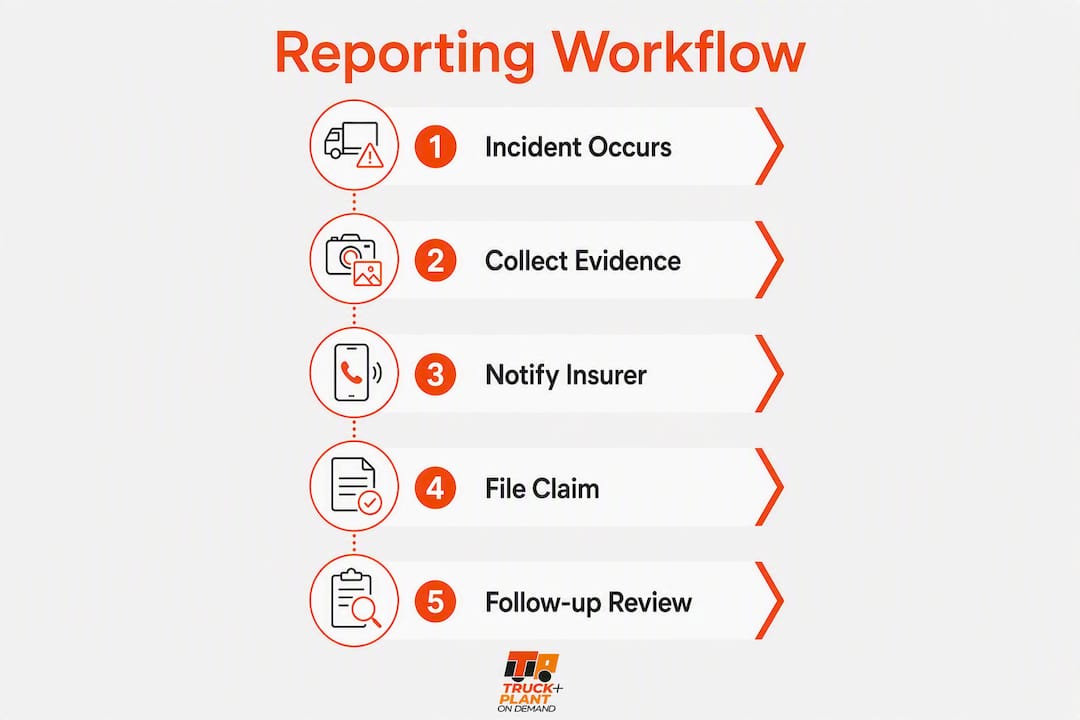
When an incident happens, your first 30 minutes determine the quality of your claim. The immediate sequence is straightforward: secure the scene and call emergency services if anyone is injured, preserve all physical and digital evidence, then notify your internal safety lead and your insurer within 24 hours. Most commercial auto policies require timely notification, and some carriers will penalise or deny cover for late reporting. Every minute you wait narrows your options.
At the scene, do these immediately:
- Move vehicles and equipment only if there is an immediate safety hazard; otherwise, hold position.
- Photograph everything before anything moves: all four angles of each vehicle, license plates, skid marks, cargo condition, and any visible damage to third-party property.
- Collect witness names, contact numbers, and employer details.
- Note the police report number and the attending officer’s badge number.
- Call your dispatch or safety officer within 30 minutes of the event.
Pro Tip: Flag and export dashcam footage immediately — most systems overwrite on a loop within hours. Pull the SD card or trigger a cloud export before the vehicle moves again.
Table of Contents
- What does a complete incidents reporting workflow look like?
- What evidence do you need to collect and preserve?
- How do you activate on-demand cover during an incident?
- What happens after you file the claim?
- Why does delayed reporting cost you more than you think?
- What internal steps close the incident loop?
- Ready-to-use templates for your reporting procedure
- Key takeaways
- Why disciplined reporting is the real competitive advantage
- How Truck & Plant On-Demand™ supports your claims from the first call
- Useful sources and references
What does a complete incidents reporting workflow look like?
A disciplined incident management workflow assigns clear actions to specific roles so nothing falls through the gaps between the scene and the open claim.
- Driver (0–30 min): Secure the scene, call emergency services if needed, photograph evidence, collect witness details, and notify dispatch by phone. Do not admit fault or make statements to third parties beyond exchanging insurance details.
- Dispatch / safety officer (0–2 hrs): Log the incident in your fleet management system, confirm the driver’s safety, and begin assembling the claim pack. Driver actions in the first 30 minutes determine the completeness of the incident record more than any later documentation.
- Safety officer (within 8 hrs for FMCSA-recordable events): Under 49 CFR 382.303, alcohol testing must be attempted within 8 hours and controlled substance testing within 32 hours for recordable accidents. Document any failure to test within those windows.
- Claims admin / broker (within 24 hrs): Notify your insurer or broker with the incident date, location, policy number, vehicle or equipment serial numbers, and a brief description of events. Request a claim number immediately.
- Safety officer (24–48 hrs): Upload the full evidence pack — photos, telematics export, police report, witness statements, and maintenance records — to your claims portal or email it to the adjuster.
Escalation triggers that demand immediate additional steps: any injury or fatality, a total loss, an environmental spill, or a third-party property claim above your deductible. For these events, notify your broker before the scene is cleared and preserve all physical evidence until the adjuster authorises release.
Pro Tip: Build a shared folder in your fleet management system labelled with the incident date and unit number the moment the call comes in. Populate it in sequence: photos first, then telematics, then statements. An adjuster can open a claim from a well-named folder in minutes.
What evidence do you need to collect and preserve?
A maintained digital inventory with serialised equipment photos updated quarterly materially speeds adjuster acceptance and settlement. Without a pre-loss baseline, proving value and cause becomes a negotiation.
Scene and vehicle evidence:
- Wide-angle and close-up photos from all four sides of each vehicle or machine
- License plates and unit numbers of all involved vehicles
- Skid marks, road conditions, and any traffic control devices
- Serial numbers and asset tags on plant or equipment
- Cargo condition and payload documentation
- Pre-loss photos from your quarterly inventory update
Statements and records:
- Signed witness statements (name, contact, employer)
- Driver or operator statement (written, same day)
- Police report number and copy when available
- Maintenance logs and last service date for the unit involved
- Proof of ownership or equipment schedule from your policy
Digital evidence:
- Dashcam footage (exported immediately, chain-of-custody noted)
- ELD or GPS telematics data covering the 30 minutes before and after the event
- Any onboard sensor alerts or fault codes
| Evidence type | Preservation method | Responsible party |
|---|---|---|
| Dashcam footage | Export to cloud or remove SD card within 2 hrs | Driver / dispatch |
| ELD / telematics data | Export via fleet portal; note timestamp | Safety officer |
| Scene photos | Upload to claim folder within 4 hrs | Driver |
| Maintenance records | Pull from fleet system; attach to claim pack | Claims admin |
| Police report | Request copy; note report number at scene | Driver |
Download Truckplant’s printable evidence checklist from truckplant.com and store one laminated copy in every cab and plant cab.

How do you activate on-demand cover during an incident?
Truck & Plant On-Demand™ lets you start and stop cover in real time, which means your policy status at the exact moment of an incident is the first thing an adjuster will verify. If cover was active, the claim proceeds. If it was not, you have a coverage gap.
Policy actions to take at incident time:
- Confirm your cover was active for the unit involved before calling the claims line.
- Have your policy number, unit serial number, and the cover period on hand when you call.
- If you activated short-term cover for a specific job, provide the activation timestamp as proof.
Common missteps that slow claims: activating cover after the incident rather than before the job starts, failing to add a new piece of equipment to the schedule before it leaves the yard, and not having serial numbers recorded in the system.
Operators who activate cover before the asset moves and keep their equipment schedule current rarely face coverage disputes. The ones who call us after the incident hoping to backdate activation create delays that hurt everyone — including their own renewal position.
Pro Tip: Keep a screenshot of your active cover confirmation on your phone before every job. It takes ten seconds and gives you instant proof of activation if the claims line asks.
The operational impact of on-demand insurance is most visible at claim time: operators with current schedules and confirmed activation timestamps move through adjuster review faster than those relying on blanket annual policies with disputed asset lists.
What happens after you file the claim?
Insurers typically request first:
- Scene photos and a written incident description
- Police report (for theft, third-party injury, or significant damage)
- Repair estimate from an approved repairer
- Vehicle or equipment maintenance history
- Proof of ownership or policy schedule entry
Typical resolution windows vary by claim type. Simple repairable physical damage claims often close in 2–4 weeks; moderate disputes take 1–3 months; serious injury or litigation cases can take 6 months to multiple years.
For managing the adjuster relationship: present evidence in a named, dated folder rather than a bulk email attachment. Avoid speculative statements about fault or speed. If a claim stalls beyond the expected window, escalate in writing to your broker and request a reserves update.
Reserves are the insurer’s internal estimate of what a claim will cost. Knowing the reserve figure helps you plan cash flow and decide whether interim rental or downtime costs should be submitted separately.
Why does delayed reporting cost you more than you think?
Transportation risk experts say the 30 minutes after a crash heavily influence final pricing and underwriting view of the insured. Delayed reporting signals poor internal controls, which underwriters price into your next renewal.
Late reporting also gives third parties time to build their version of events before your adjuster arrives. Witnesses disperse, dashcam footage overwrites, and skid marks fade. The practical consequence is a weaker negotiating position on liability.
Pro Tip: Set a 30-minute internal SLA from incident notification to dispatch confirmation. A simple automated SMS alert from your fleet system to the safety officer — triggered when a driver logs an incident — enforces this without relying on memory.
How your incident history is documented also affects fleet insurance renewal terms. Carriers reward operators who report promptly, document thoroughly, and close claims cleanly.
What internal steps close the incident loop?
Post-incident administrative checklist:
- Authorise repairs only after the adjuster has inspected or waived inspection in writing.
- Document the vehicle or equipment hold and release dates for downtime claims.
- Notify any financier or lender if the asset is under a finance agreement.
- Collect subcontractor statements if third-party operators were involved.
- Submit rental or substitute equipment costs with receipts to the claims file.
Recommended file retention: Keep the complete claim file for at least seven years. Structure it as: incident report, evidence pack, adjuster correspondence, repair invoices, and closure confirmation.
KPIs worth tracking for your incident reporting process:
- Average time from incident to insurer notification (target: within a day)
- Documentation completeness rate (% of claims with full evidence pack at first submission)
- Claim closure time by claim type
- Cost per claim by asset category
Use your fleet risk assessment checklist to benchmark these figures quarterly.
Pro Tip: Run a 20-minute lessons-learned review within 48 hours of every significant incident. Ask three questions: what happened, what evidence was missing, and what process change prevents recurrence. Document the answers and attach them to the claim file — insurers view this as evidence of a managed safety culture.
Ready-to-use templates for your reporting procedure
A structured mobile reporting form captures required fields in sequence and surfaces reports to dispatch and safety teams immediately, preventing the information gaps that slow claims.
| Template | Intended user | Key contents |
|---|---|---|
| Driver incident report form | Driver | Scene details, photos checklist, witness info, police report number |
| Safety officer claim pack checklist | Safety officer | Evidence log, FMCSA testing windows, insurer notification record |
| Insurer notification script | Claims admin | Policy number, unit details, incident summary, claim number request |
| Evidence file naming convention | All roles | Date_UnitID_IncidentType format for adjuster-ready folders |
Store all templates in your fleet management system and link them to your telematics dashboard so they open automatically when a driver logs an incident. For logistics operations, documented transport procedures that integrate with your reporting forms reduce duplication and keep records consistent across the claim lifecycle.
Key takeaways
A disciplined incidents reporting workflow — from scene preservation to insurer notification within 24 hours — is the single most effective way to protect your claim outcome and your renewal terms.
| Point | Details |
|---|---|
| Notify within 24 hours | Most policies require insurer notification within 24–72 hours; some carriers require within 24 hours, and late reporting can void cover or trigger penalties. |
| Preserve digital evidence first | Export dashcam and ELD data within hours — overwrite cycles erase footage quickly. |
| Pre-loss photo inventory | Quarterly serialised equipment photos materially speed adjuster acceptance and settlement. |
| FMCSA testing windows | Alcohol testing within 8 hours, drug testing within 32 hours for recordable accidents under 49 CFR 382.303. |
| Truckplant on-demand cover | Activate Truck & Plant On-Demand™ before the asset moves and keep your equipment schedule current to avoid coverage disputes at claim time. |
Why disciplined reporting is the real competitive advantage
Most operators focus on the claim itself. The smarter focus is on the 30 minutes before the claim exists. What you do at the scene, how quickly you notify your insurer, and how completely you document the event shapes not just this claim but every renewal conversation that follows. Underwriters are pattern-recognition machines. An operator who reports promptly, submits complete evidence, and closes claims cleanly looks fundamentally different from one who calls three days later with a partial photo set and no telematics export. That difference shows up in premium pricing, in underwriting appetite, and in how much goodwill you have when a complex claim needs a fair hearing. Truck & Plant On-Demand™ is built around this reality: real-time policy controls and guided digital claims intake mean your reporting process and your cover status are always aligned.
How Truck & Plant On-Demand™ supports your claims from the first call
No fleet operator should be managing a claim with a spreadsheet and a phone call to a broker who hasn’t seen the asset in two years. Truckplant’s Truck & Plant On-Demand™ gives you instant policy activation, a guided digital incident form that captures every field an adjuster needs, and a claims portal where you upload evidence and track status in real time. Cover starts when you need it and stops when you don’t, so your schedule and your policy are always in sync.
For fleet operators and plant hire businesses ready to replace slow, fixed-premium cover with a policy that moves with your operations, visit truckplant.com to activate cover or speak to the team about a tailored fleet solution.
Useful sources and references
- The Underwriter’s Checklist, Part 5: The 30 Minutes After a Crash Determines Your Final Price Tag — SBInsure: authoritative underwriter perspective on how post-crash actions affect pricing and renewal.
- Accident and Incident Reporting Workflows in Trucking — FleetRabbit: practical driver and dispatch workflow guidance, including FMCSA testing windows.
- How to File a Commercial Trucking Insurance Claim — OLPolicy: insurer notification windows, dashcam preservation, and claim-filing steps.
- Insurance Claim Process for Trucking: Step-by-Step Guide — USA Trucker Choice: claim resolution timelines by claim type.
- Construction Equipment Insurance: Cost and Coverage Guide — GetBusinessCoverage: scheduled vs. blanket cover, serialised inventory, and adjuster documentation requirements.
- Step-by-Step Commercial Claims Checklist — Insurance Curator: evidence, notifications, and estimator guidance for commercial claims.
- Truckplant fleet claims process guide — Truckplant: five-step claims process for faster settlements, tailored to fleet and plant operators.